Smart Locks: Biometric Hotel Access & Video Door Phone
Introduction
Hotels, offices and homes often need both robust security and user convenience. Traditional locks struggle here because physical keys can be lost, copied or worn out. Smart Locks solve this by replacing keys with digital credentials. For example, smart locks can use PIN codes, mobile apps or even biometric scans (fingerprints, face recognition) to unlock doors. In addition, these systems integrate into broader hotel lock solutions; a staff member can see a guest on a video door phone before remotely unlocking the smart lock. In short, smart locks form part of a modern keyless entry system that enhances safety and simplifies access control for any property.
What Is Smart Locks — Core Concept Explained
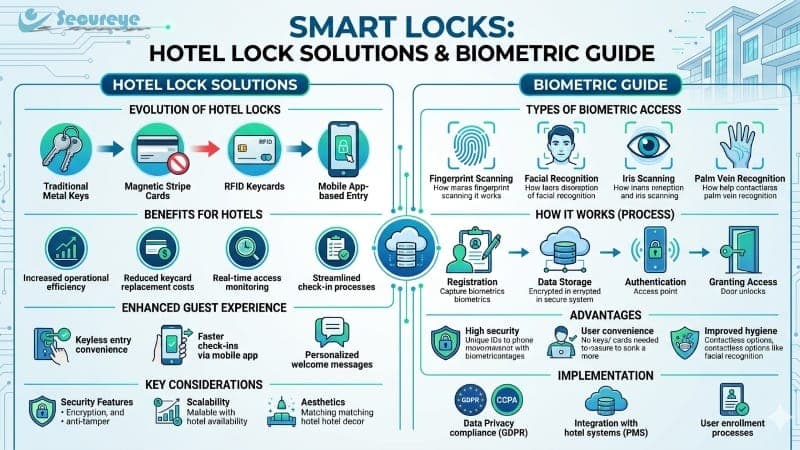
Smart locks are electronic door locks that use digital authentication instead of mechanical keys. Owners can unlock doors with fingerprints, PINs, RFID cards or smartphone apps. For instance, a hotel might use RFID keycards tied to each guest; when inserted or tapped, the smart lock grants access only if the card is authorized. The lock’s electronics then record each entry in a log. In practice, facility managers can remotely manage these locks. They lock or unlock doors from anywhere via a secure app, and they receive instant alerts whenever someone enters or exits. As a result, smart locks eliminate the need to change or copy physical keys and provide complete digital control over who can access a door.
Key Benefits of Smart Locks
Enhanced security: Smart locks add layers beyond traditional locks. They use strong encryption, tamper alerts and audit trails, so businesses enjoy better protection against break-ins. In hotels and offices, smart locks often include biometric checks (like fingerprint scans) that identify users by their unique traits. This makes unauthorized entry nearly impossible.
Keyless convenience: Residents and staff unlock doors without worrying about keys. Smart locks accept multiple methods – fingerprint, RFID cards, PIN codes, or mobile credentials – making entry fast and easy. Consequently, hotels can give guests digital room keys on their phones instead of plastic cards. As a result, lost-key incidents drop dramatically and access becomes more flexible.
Remote access & management: A building manager controls doors from anywhere using a smartphone app. The app locks or unlocks doors, schedules guest access, and shows an access history instantly. For example, a homeowner can check if the door is locked when away, or a concierge can issue a temporary code to maintenance staff. This remote management dramatically reduces locksmith calls and improves operational efficiency.
Integration & automation: Smart locks work with other security and home systems. For example, they can link to CCTV cameras and video door phones, so staff first verify visitors on camera before pressing “unlock”. They also plug into alarms or hotel management software. In effect, smart locks become part of a smart security solution that unifies all access control. This lets property owners automate tasks (auto-locking doors at night, revoking codes upon guest checkout, etc.) and monitor everything from one dashboard.
Efficiency for hotels & businesses: These devices simplify guest check-in and employee access. In a hotel lock solution, staff assign digital keys to guests instead of handing out physical keys. When a guest checks out, the system automatically disables that key. As a result, hotels avoid lost-key problems and front-desk bottlenecks. Meanwhile, offices can onboard or remove user access instantly without rekeying doors. This streamlined operation saves time and reduces security risks.
How to Choose Smart Locks
- Assess Your Property Needs. A facility manager first identifies the door type and usage. They determine if the lock will secure a home entry, office door or hotel room, as each use case requires different features. For example, a hotel needs locks that integrate with its management software, while a home user may prioritize smartphone control.
- Select Access Methods. Next, decide which unlocking options to enable. The manager chooses from fingerprint sensors, RFID keycards, PIN keypads or mobile app access. It’s wise to include a backup method (like a mechanical key or offline PIN) in case of power loss. Each method should match the users: staff and residents use fingerprints, guests use mobile keys, etc.
- Verify Compatibility. Ensure the smart lock fits your door and systems. The technical team checks lock size, battery or power needs, and whether it needs Wi-Fi, Bluetooth or 4G. They also confirm compatibility with existing security systems, such as CCTV or video intercoms. In hotels, this means checking integration with property management and energy-saving systems.
- Plan Installation. A trained technician installs the smart lock hardware on the door. They wire power or network connections if needed and mount the electronic components securely. Installation must align with manufacturer guidelines to ensure reliability. For businesses, professional installation helps avoid mistakes that could compromise security.
- Set Up Users & Test. After installation, the administrator programs user profiles. They register fingerprints, create card IDs or set up app credentials. Then they test each access method on different doors. The team ensures that doors lock and unlock correctly, mobile notifications arrive, and any fail-safes (like battery backup) work as expected. Any issues get resolved before full deployment.
Comparison / Pros and Cons
Video Door Phone: Enhanced Visitor Verification
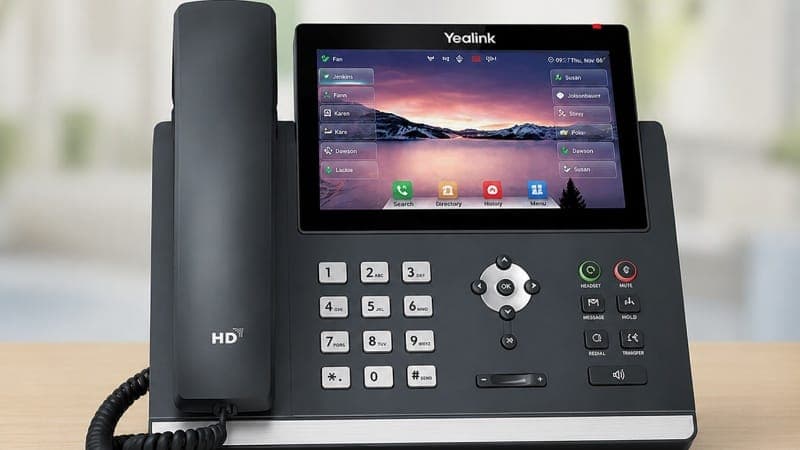
Video door phone systems pair a camera and intercom at the entry. They provide real-time video and two-way audio communication, so staff or residents can see and speak to visitors without opening the door. For example, a receptionist can verify a delivery person on the screen before pressing “unlock.” These devices often include motion detection, night vision, and smartphone connectivity. Consequently, video door phones deter unauthorized guests and streamline visitor management.
visit site:- https://www.secureye.com/products/smart-locks
Frequently Asked Questions
What is Smart Locks: Biometric Hotel Access & Video Door Phone?
IntroductionHotels, offices and homes often need both robust security and user convenience. Traditional locks struggle here because physical keys can be lost, copied or worn out. Smart Locks ...
Why is Smart Locks: Biometric Hotel Access & Video Door Phone important?
This article explains the key aspects of Smart Locks: Biometric Hotel Access & Video Door Phone in detail, covering essential information and practical insights.
How can I learn more about technology?
Read the full article on Jorvea for comprehensive information about Smart Locks: Biometric Hotel Access & Video Door Phone and related topics.