Fancy Font Generators: The Complete Guide for 2026
Fancy Font Generators: The Complete Guide for 2026
Text styling has quietly become one of the simplest ways to stand out online.
Whether it is an Instagram bio, a Discord username, a TikTok caption, or a Facebook post, the font you use says something about your personality before anyone reads a single word.
This is exactly why fancy font generators have grown so popular over the past few years—and why understanding how they work can help you make the most of them.
What Is a Fancy Font Generator?
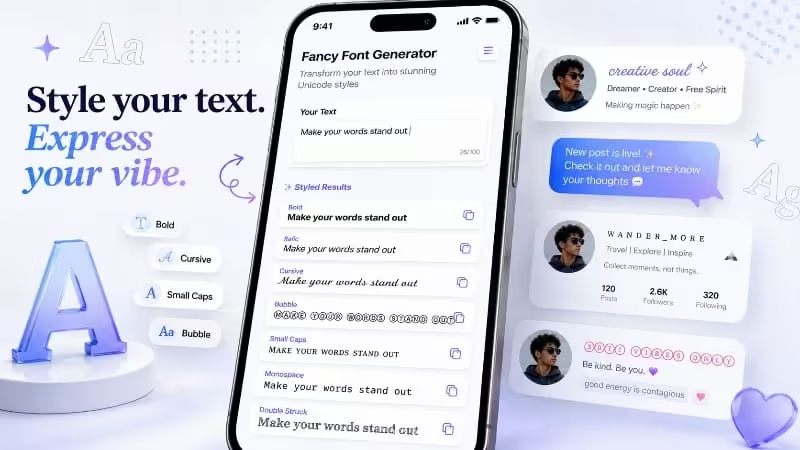
A fancy font generator is a free online tool that converts ordinary typed text into stylized versions using special Unicode characters.
Unlike traditional fonts that require graphic design software or installation, these generators work directly in your browser. You type your text once, and the tool instantly produces dozens of variations, such as:
- Bold
- Italic
- Cursive
- Bubble text
- Strikethrough
- Upside-down text
- Small caps
- Decorative text
The technology behind this is surprisingly elegant.
Unicode, the international standard for text encoding, includes thousands of characters beyond the basic alphabet. Many of these characters look like stylized letters, even though they may technically be classified as symbols, mathematical notations, or characters from other writing systems.
Font generators map regular letters to visually similar Unicode characters. This is why the styled text can usually be copied and pasted into other platforms—it is still text, not an image.
Why Fancy Fonts Have Become So Popular
The rise of social media platforms built around visual identity has fueled the popularity of fancy fonts.
Several factors explain this trend.
Personal Branding Matters More Than Ever
Content creators, small business owners, and everyday users want their profiles to feel distinct.
A unique font style in an Instagram bio or social media profile can make the account more memorable in a sea of profiles using identical default text.
No Technical Skills Are Required
These tools require no design experience.
You do not need to learn graphic design software or understand advanced typography rules. Anyone can open a font generator, enter a few words, and produce stylish text within seconds.
Styled Text Works Across Many Platforms
Because the output is Unicode text rather than an image, it can often be used across platforms such as:
- TikTok
- Discord
- X
- Email signatures
- Messaging applications
Compatibility may vary depending on the characters and platform being used, so it is still useful to test the text before publishing it.
Most Tools Are Free
Most fancy font generators, including tools such as FontifyText, are free to use and do not require an account or signup.
This accessibility allows anyone to experiment with different styles instantly.
Common Uses for Fancy Fonts
Understanding how people use stylized text helps explain why these tools remain popular.
Social Media Bios
Social media bios are one of the most common places to use fancy fonts.
A bold, cursive, or small-cap name near the top of an Instagram or TikTok profile can immediately attract attention. Creators may also use styled text for:
- Taglines
- Job titles
- Short descriptions
- Calls to action
- Bio link labels
Gaming Usernames
Gaming platforms and communities are another major use case.
Discord users and gamers often use stylized letters, decorative symbols, and unusual character combinations to create recognizable usernames.
A distinctive username can help someone establish a consistent identity within a server, group, or gaming community.
Captions and Social Posts
Fancy fonts can also make important parts of a caption stand out.
Rather than styling an entire caption, many users apply a decorative style only to:
- The opening line
- A heading
- A key phrase
- An announcement
- A call to action
Using styled text selectively usually produces a cleaner and more readable result.
Business and Marketing Content
Small businesses managing their own social media accounts may use fancy fonts for:
- Sale announcements
- Product launches
- Event promotions
- Limited-time offers
- Important updates
Styled text can add visual interest without requiring a new graphic for every post.
However, businesses should avoid using overly decorative text in important information that needs to remain clear and accessible.
Personal Messages
Fancy fonts are also commonly used in casual communication.
People may add bubble text, cursive writing, or decorative characters to:
- Birthday messages
- WhatsApp statuses
- Private chats
- Friendship messages
- Celebration posts
- Short greetings
How to Use a Fancy Font Generator
Using a tool such as FontifyText is straightforward. The same basic process applies to most online font generators.
Step 1: Enter Your Text
Open the generator and type the name, word, sentence, or phrase you want to style into the input box.
Shorter text often displays more cleanly across different platforms, especially in usernames and profile bios.
Step 2: Browse the Generated Styles
As soon as you enter your text, the generator will normally display several variations.
These may include:
- Bold text
- Italic text
- Cursive text
- Bubble text
- Strikethrough text
- Small caps
- Decorative symbols
- Upside-down text
Scroll through the available results and choose a style that matches your intended use.
Step 3: Copy Your Preferred Style
Select the copy button beside the style you want.
You may also be able to highlight and copy the text manually. Because the result uses Unicode characters, copying it works similarly to copying ordinary text.
Step 4: Paste the Styled Text
Paste the copied result into the platform or application where you want to use it.
For example, you could paste it into:
- An Instagram bio
- A TikTok caption
- A Discord username
- A Facebook post
- A WhatsApp status
- A profile description
- A private message
There is no image upload or design file required.
Choosing the Right Font Style
Not every fancy font style is suitable for every situation. Choosing a style intentionally can make the final result more effective.
Professional and Business Profiles
For professional profiles, subtle styling usually works best.
Consider using:
- Clean bold text
- Minimalist styles
- Light small-cap styling
- Simple decorative headings
These styles can add emphasis while keeping the profile polished and readable.
Gaming and Casual Profiles
Gaming communities and casual social profiles can support more expressive styles.
Popular options may include:
- Bubble text
- Glitch-style text
- Gothic text
- Symbol-heavy combinations
- Decorative borders
- Unusual character styles
These options can match the playful and creative tone of gaming communities.
Creative and Artistic Accounts
Cursive and script-style text can work well for accounts related to:
- Photography
- Art
- Fashion
- Beauty
- Lifestyle content
- Handmade products
- Creative portfolios
These styles can add a handwritten or elegant appearance.
Prioritize Readability
Readability should not be completely sacrificed for style.
Highly decorative fonts may become difficult to understand:
- At small sizes
- On mobile devices
- On older devices
- In long paragraphs
- When mixed with too many symbols
Always test the styled text on the platform and device where it will be displayed.
Are Fancy Fonts Safe to Use Everywhere?
In most cases, fancy Unicode text can be used without causing technical problems. The characters are part of the Unicode standard and are supported by many modern applications and websites.
However, there are a few limitations to consider.
Character Limits
Some platforms may count stylized Unicode characters differently from normal letters.
This can cause the text to use more of the available character limit than expected, particularly in bios, usernames, and short descriptions.
Device Compatibility
Some less common decorative characters may not display correctly on:
- Older smartphones
- Outdated operating systems
- Certain browsers
- Unsupported applications
A missing or unsupported character may appear as an empty box or replacement symbol.
Accessibility
Screen readers may not interpret stylized Unicode characters in the same way they interpret ordinary text.
For this reason, important information such as instructions, contact details, business names, and essential messages should remain available in normal text.
Search Engine Optimization
Avoid using heavily stylized Unicode text in important website content, such as:
- Page titles
- Main headings
- Product names
- Navigation labels
- Important body text
- Content intended to rank in search engines
Some Unicode substitutions may not be interpreted in the same way as standard letters by search engines or accessibility tools.
For casual social media use, this is usually less of a concern.
Tips for Using Fancy Fonts Effectively
Follow these practical guidelines to keep your styled text attractive and readable:
- Use decorative text selectively. Style a name, heading, or short phrase instead of an entire paragraph.
- Test the text on mobile. A style that looks clear on desktop may be difficult to read on a smaller screen.
- Keep important information readable. Avoid applying complex styles to phone numbers, links, prices, or instructions.
- Do not combine too many styles. Using several fonts and decorative symbols together can make the result look cluttered.
- Check platform compatibility. Paste the text into the intended platform before finalizing your profile or post.
- Consider accessibility. Include normal text when the information needs to be understood by everyone.
- Match the style to your purpose. A professional profile usually needs a cleaner style than a gaming username or casual message.
The Future of Text-Styling Tools
As social platforms continue to emphasize personal branding and visual identity, fancy font generators are likely to keep evolving.
Many tools are already expanding beyond basic text conversion by introducing features such as:
- Emoji combinations
- Decorative symbol suggestions
- Text borders
- Username ideas
- Styled bio templates
- Character counters
- Live text previews
- Platform-specific text styles
The core appeal, however, remains the same: these tools offer a fast, free, and accessible way to add personality to written text without requiring design skills or specialized software.
Whether you are creating an Instagram bio, setting up a Discord username, writing a TikTok caption, or sending a fun message to a friend, a fancy font generator provides creative flexibility within a few clicks.
Final Thoughts
Fancy font generators have earned their popularity by solving a simple problem: making ordinary text more expressive without requiring design expertise.
Free, browser-based tools have made text styling accessible to almost anyone with an internet connection. Users can enter ordinary text, compare different Unicode styles, copy their preferred result, and paste it into supported platforms.
The best results come from using fancy fonts selectively. Choose a style that matches the purpose, keep readability in mind, test compatibility, and use normal text for important information.
As personal branding continues to influence how people present themselves online, fancy font generators are likely to remain a useful part of social media profiles, usernames, captions, messages, and digital communication.
📖 Read more blogs: Jorvea — Free Guest Blogging & Content Publishing Platform
Frequently Asked Questions
What is a fancy font generator?
A fancy font generator is a free online tool that converts regular typed text into stylized versions using special Unicode characters, such as bold, cursive, bubble, or italic styles. The output is still plain text, so it can be copied and pasted into any app or platform.
Are fancy fonts safe to use on Instagram, TikTok, and Discord?
Yes. Fancy fonts generated through Unicode are fully compatible with virtually all major social platforms, including Instagram, TikTok, Discord, Facebook, and Twitter, since they are standard text characters rather than images.
Do I need to download anything to use a font generator?
No. Most fancy font generators, including tools like FontifyText, work entirely in your web browser. There's nothing to install, and most require no signup or account creation.
Can fancy fonts affect SEO or readability?
Heavily stylized fonts are best avoided in important written content meant for search engines, since some characters aren't parsed the same way as standard text. For casual use like social media bios and captions, this isn't a concern.
What's the best free fancy font generator to use?
There are several good options available, with FontifyText (fontifytext.com) being a popular free choice that offers a wide range of font styles including bold, cursive, bubble, and aesthetic text, with no signup required.

_1781593927369.jpg&w=1200&q=75)